Tiếng Việt
Technical Support
Upgrading or Verifying Stratix Firmware
Summary
Upgrading or Verifying Stratix Firmware
Environment
- Stratix 8000
- Stratix 8300
- Stratix 5700
- Stratix 5400
- Stratix 5410
- Stratix 5100
- Stratix 5900
- ArmorStratix 5700
- Stratix 2500
Answer
Verifying the firmware
Note: If the firmware is loading off of the SD Card, will need to remove the SD Card before updating Stratix firmware. If not, firmware will revert to saved version on the card after the flash.
Option 1
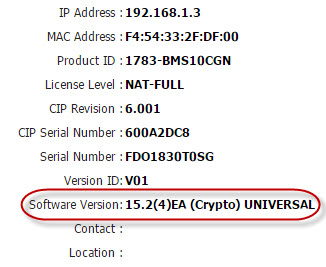
- Enter the IP Address of the switch in the webpage and log in.
- The Software Version as 15.2(4)EA (Crypto) UNIVERSAL circled RED on the screenshot below, which is the current FW version the switch has loaded:
Option 2
- Follow QA17628 – Access CLI on a Stratix switch to gain access to the Command Line Interface (CLI) of the switch.
- Type in
show verand press Enter. - The SW Version as 15.2 (4) EA circled RED on the screenshot below, which is the current FW version the switch has loaded:

Option 3
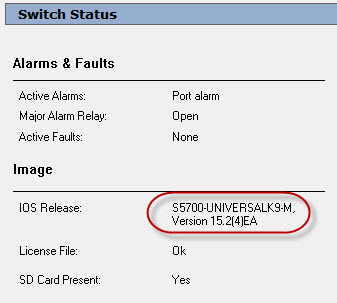
- Open Studio 5000 software.
- Locate the switch in the I/O Configuration tree.
- Select Switch Status.
- The Software Version as IOS Release: S5700-UNIVERSALK9-M, Version 15.2(4)EA circled RED in the screenshot below, which is the current FW version the switch has loaded:
Upgrading the firmware
There are a number of options for upgrading the firmware of a Stratix switch. You can do so using:
- Device Manager (web page)
- FactoryTalk Network Manager
- Command Line Interface (TFTP)
The Stratix firmware can be found on the Stratix Firmware Updates web page (find downloads).
Upgrading the firmware does not clear the current configuration on the switch; do not unzip the tar file.
Device Manager
- Open Internet Explorer and browse to the web page of your switch.
- Enter the password.
- For Firmware releases 12.x(x), on the left hand side of the screen, browse to Maintenance and then Firmware Upgrade.
- Click on the Browse button and select the new firmware file.
- For Firmware releases above 12.2(55) Change the File type to All
- Browse to the Location where the firmware is located.
- Select the file for the appropriate Switch
- Stratix 8000 =
ies-lanbase-tar.152-x.EA.tar - Stratix 8300 =
ies-ipservices-tar.152-x.EA.tar - Stratix 5700 =
s5700-universal-tar.152-x.EA.tar - Stratix 5400 =
s5400-universal-tar.152-x.EA1.tar - Or Select the zipped folder
- Stratix 8000 =
- Click Upgrade.
- For Firmware releases 15.x(x), on the top of the menu click Admin --> Software Update.
- Browse to the Location where the firmware is located.
- Select the file for the appropriate Switch.
- Stratix 8000 =
ies-lanbase-tar.152-x.EA.tar - Stratix 8300 =
ies-ipservices-tar.152-x.EA.tar - Stratix 5700 =
s5700-universal-tar.152-x.EA.tar - Stratix 5400 =
s5400-universal-tar.152-x.EA.tar - Stratix 2500 =
s2500-universalk9-mz.SPA.x.x.x.x.bin
- Stratix 8000 =
- Click Update.
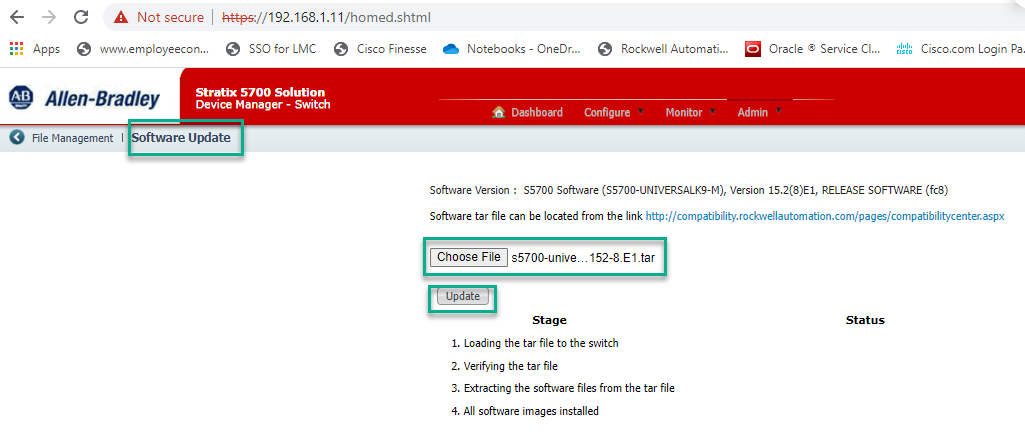
- The file will be transferred to the switch. This procedure may take 5-10 minutes, but the switch will remain operational. Once transfer is complete, the switch will install the new files The installation will may take 15-20 minutes. Once the install is complete, it will prompt you to restart. When you click restart, communication through the switch will be lost until it has completed the boot sequence.
FactoryTalk Network Manager
To upgrade a switch using FactoryTalk Network Manager, follow this procedure: QA62488 – Upgrading Stratix Switch Firmware with FactoryTalk Network Manager
TFTP using Command Line Interface
It is possible to update the firmware of a Stratix using CLI.
***** TechConnect *****
For detailed information on updated the firmware of a Stratix using Command Line Interface, see QA53114 – Stratix Firmware upgrade from Command Line Interface.
***** End TechConnect *****
Notes:
- In each case, the switch configuration is not affected by the firmware upgrade.
- EDS files for the latest firmware can be found at the Rockwell Automation EDS Resource Page.
- ControlFlash cannot upgrade the firmware on a Stratix switch.
- You cannot upgrade a Stratix 5700 from Lite to Full functionality via a firmware upgrade – the appropriate catalog number must be purchased.
- Use the upgrade procedure to downgrade the Stratix firmware.
- We do not publish a 15.2(8)E1 build for 8300. The latest released one is 15.2(4)Ea.
- You can upgrade by a maximum of 4 versions at a time using Device Manager or CLI. You can upgrade more than 4 versions at a time using Network Manager.