Tiếng Việt
Technical Support
Stratix switches: USB Driver for Console Port
Summary
Stratix switches: USB Driver for Console Port
Environment
- Stratix 5700
- Stratix 5400
- Stratix 5410
- Stratix 5200
- Stratix 5800
Answer
In order to connect to the mini-USB console port of a Stratix switch from a USB port of a PC, the correct driver needs to be installed in Windows so that the USB connection gets a serial port number assigned which can be used to connect to it.
Before installation, you will see a yellow exclamation mark next to the driver and no COM port has been assigned.
Follow below steps to install the driver and to verify:
- Download these drivers from the following location:
- Stratix 5700, 5400, 5410 (Classic IOS): The driver can be downloaded from the Cisco website, Software Download – Cisco Systems (Cisco_usbconsole_driver_3_1.zip).
- Stratix 5200, 5800 (IOS-XE): The driver can be downloaded from the Silabs website: https://silabs.com/developers/usb-to-uart-bridge-vcp-drivers (CP210x Universal Windows Driver).
- Install the driver(s).
- After installing the driver(s) successfully, Windows will detect the USB connection and assign a COM port.
- Verify the COM port and the correct installation of the driver.
Open Windows Device Manager by right-clicking Start (Windows logo) and select Device Manager.
Expand the Ports (COM & LPT) category
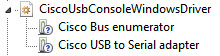
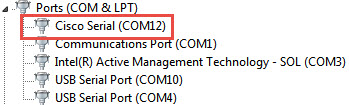
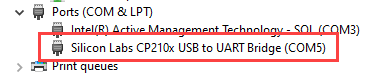
You will see the following:
For Stratix 5700, 5400, 5410:
For Stratix 5200, 5800:
In case of problems when installing the driver for Stratix 5700, 5400 and 5410, please have a look at the README.pdf document that comes with the download or see BF24296 – Stratix switches: USB driver doesn’t install or work properly for further directions.
You can now establish a mini-USB console session to the Stratix switch, via the mini-USB cable, by means of PuTTY or HyperTerminal to access the Command Line Interface.