
 Tiếng Việt
News, Consulting, Stratus Technologies
What Is Server Virtualization? A Comprehensive Guide to the Technology, Software, and Setup
Server virtualization is a core technology in managing modern IT infrastructure. By allowing multiple operating systems (OS) to run simultaneously on the same physical hardware, virtualization helps improve performance, reduce costs, and enhance flexibility.
This in-depth article provides a comprehensive guide, including how it works, strategic benefits, differences compared to Cloud, key risks to watch out for, and basic steps to successfully implement this technology.
What Is Server Virtualization?
Definition and How It Works
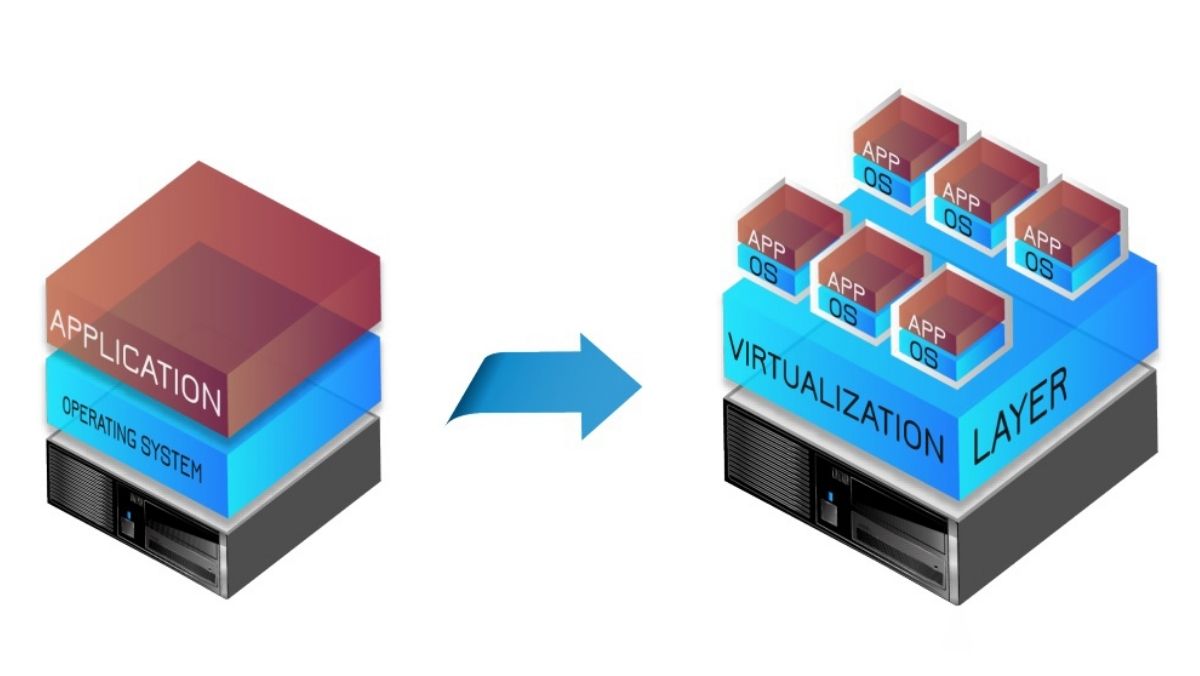
Server virtualization is a technique that decouples the operating system layer from the physical hardware. It uses a software layer called a Hypervisor to share and allocate the resources of a single physical server (CPU, RAM, storage) into multiple independent virtual server environments, called Virtual Machines (VM).
Each Virtual Machine operates like a fully functional physical server, with its own operating system (Guest OS), applications, and dedicated resources.
Distinguishing Server Virtualization and Desktop Virtualization
| Characteristic | Server Virtualization | Desktop Virtualization |
|---|---|---|
| Purpose | Optimize hardware resources, consolidate servers, increase High Availability (HA) for critical applications. | Run multiple operating systems on a personal computer, test software. |
| Environment | Data centers, dedicated servers. Uses Type 1 (Bare-metal) hypervisors. | Personal computers, workstations. Uses Type 2 (Hosted) hypervisors (e.g., VirtualBox, VMware Workstation). |
Strategic Benefits of Virtualization Technology
Virtualization helps businesses effectively address challenges related to operating costs, resource waste, and deployment speed.
Cost Optimization and Resource Efficiency
- Maximize hardware utilization: By consolidating multiple physical servers into VMs on a single powerful server, virtualization increases CPU and RAM utilization from below 15% up to 80% or higher.
- Space efficiency (Consolidation): Significantly reduces the physical space required in the data center thanks to a lower number of physical servers.
- Reduce CAPEX & OPEX: Saves on hardware procurement costs (CAPEX) and operating costs such as power, cooling, and rack space (OPEX).
Flexibility, Availability, and Recovery (HA/DR)
- Increase Redundancy: Applications can run on multiple VMs distributed across different physical servers, reducing the risk of simultaneous failures and ensuring continuity (HA).
- VM Migration: VMs can be moved (Live Migration) between physical servers without downtime, enabling maintenance without disrupting services.
- Disaster Recovery (DR): Easy to create snapshots and back up entire VMs, significantly reducing the Recovery Time Objective (RTO).
Support for Development and Legacy Systems
- Isolated test environments (Sandbox): Provides isolated VMs for Development (DEV) and Testing (TEST) environments without affecting the Production (PROD) environment.
- Extending Legacy Systems: Allows legacy applications that only run on outdated hardware to continue operating seamlessly on virtualized versions of that hardware, hosted on modern servers.
Common Forms of Virtualization
| Form | Description | Main Use Cases | Examples |
|---|---|---|---|
| Bare-metal (Type 1) | Hypervisor is installed directly on the physical hardware (no Host OS required). | Production environments, data centers. | VMware ESXi, Microsoft Hyper-V, KVM. |
| Hosted (Type 2) | Hypervisor is an application running inside the host operating system. | Testing, personal development, simulation. | Oracle VirtualBox, VMware Workstation. |
| Storage Virtualization | Aggregates physical storage (SAN, NAS) into a single pool of resources. | Optimize storage capacity, centralized management. | VMware vSAN, Ceph. |
| Network Virtualization | Creates logical (virtual) networks that are independent of the underlying physical network infrastructure. | Network isolation between VMs, enhanced security (VLAN, virtual firewalls). | VMware NSX-T. |
Leading Server Virtualization Software
| Platform | Position and Characteristics | Best For |
|---|---|---|
| Stratus zero-touch computing | Edge computing platform. Extremely high availability (99.99999%). Automated, easy remote management, IT/OT convergence. | Critical applications, Edge environments, continuous availability requirements. |
| VMware vSphere / ESXi | Gold standard, market leader. Provides a comprehensive toolset and advanced features (vMotion, HA, DR). | Large enterprises requiring top performance and reliability. |
| Microsoft Hyper-V | Native virtualization platform, deeply integrated into Windows Server. Reliable and cost-effective solution. | Organizations heavily dependent on the Microsoft ecosystem (Windows, Active Directory). |
| Proxmox VE / KVM | Powerful open-source solution integrating both VMs and containers (LXC). | Small and medium businesses seeking low cost and high flexibility. |
Difference Between Virtualization (VM), Physical Servers, and Cloud Computing

Server virtualization is a foundational technology for the Cloud, but they differ in their operating models:
| Feature | Virtual Server / VM | Physical Server | Cloud Computing |
|---|---|---|---|
| Definition | Software instances running on a physical host server. | Independent, tangible hardware units. | A network of remote servers and storage devices accessed over the Internet. |
| Ownership/Control | Control over software (Guest OS) while sharing hardware resources. | Full control over both hardware and software. | Control over resources via a management console, with hardware managed by the provider. |
| Hardware | Shares the host’s resources. | Dedicated hardware. | Resources shared across many physical servers in the provider’s data centers. |
| Cost | Lower upfront cost, internal operating expenses (OPEX). | High upfront cost (CAPEX). | Pay-as-you-go model with low upfront costs. |
| Flexibility | Highly flexible and easy to scale on the host. | Less flexible and harder to scale. | Highly flexible and nearly infinitely scalable. |
Risks, Challenges, and Mitigation Strategies
Although virtualization offers many benefits, its implementation must be carefully planned to avoid potential risks.
Key Risks to Watch Out For
- Single Point of Failure: A hypervisor failure can cause all VMs running on it to go down, leading to downtime and data loss.
- Performance Bottlenecks: Oversubscribing a physical server with too many VMs can cause bottlenecks, especially in I/O (storage).
- Security Risks: Virtualized environments may face new threats such as hypervisor attacks or VM Escape vulnerabilities (escaping a VM to access the host).
- Complexity and Management Challenges: Managing a large, complex virtualized environment requires advanced expertise and is prone to operational errors.
How to Mitigate Risks and Deployment Considerations
| Challenge | Mitigation Strategy | Deployment Considerations |
|---|---|---|
| Single Point of Failure | Implement Redundancy and High Availability (HA) for hypervisors, storage systems, and networks. | Require UPS and cluster architectures with automatic failover. |
| Performance Degradation | Continuous Monitoring and Optimization: Continuously monitor VM and host performance to balance load and allocate resources properly. | Prioritize using SSD/NVMe instead of traditional HDDs to alleviate I/O bottlenecks. |
| Security Issues | Implement strong security controls, including frequent hypervisor patching, access control, and network isolation (VLANs, virtual firewalls). | Leverage the hypervisor’s VM Isolation capabilities to ensure a compromised VM cannot affect others. |
| Management & Costs | Use efficient management tools to automate tasks and simplify administration. | Calculate ROI from hardware savings versus software licensing costs (VMware, Hyper-V) and training/staffing expenses. |
| Incompatibility | Engage reputable vendors and consultants to ensure I/O devices and drivers are compatible with your virtualization technology, especially for older or proprietary I/O cards. | Plan a comprehensive Disaster Recovery strategy and test compatibility when migrating between platforms. |
Practical Applications of Server Virtualization
- Data Center Consolidation: Reduces rack space and costs related to power and cooling.
- Core System Deployment: Run ERP, CRM, database servers, and web servers on a single virtualization cluster.
- Sandbox (DEV – TEST – PROD): Set up development, testing, and production environments as replicas of each other by cloning VMs.
- Training and Simulation: Build virtual labs with multiple VMs to simulate complex network architectures (Active Directory, firewalls, VPN).
Key Considerations When Using Server Virtualization

Learn how to leverage the benefits of server virtualization while avoiding mistakes that could impact the availability and performance of critical IT applications in production.
Understand your application
Start by precisely identifying your application software and its workload. What resources does your application use? How much? When? How much capacity do you need for peak times and temporary demand spikes? If performance drops, the application may become unavailable and provide poor response times to users or processes.
Additionally, perform an appropriate risk assessment. Even if you start with non-critical applications, the server consolidating them often becomes critical as it hosts multiple applications. Also, not every application is suitable for virtualization. Typical examples include I/O-intensive applications and performance-sensitive environments whose characteristics are not easily defined.
Consider the risks
Because virtual servers are easy to set up and do not require management approval like hardware purchases, some companies face “VM sprawl.” You may also experience performance degradation, with the degree depending on the application and the virtualization technology you use. Furthermore, optimizing availability and performance of applications on VMs requires significant expertise. You also need to understand how virtualization affects your software licensing costs.
Choose robust enterprise-grade technology
Keep in mind that the virtualization layer can become a single point of failure for all the VMs it supports. One principle: software reliability increases as its code volume and complexity decrease.
Look for virtualization software that is small, lean, and tightly controlled — and behaves as much like an appliance as possible. Virtualization and availability solutions that are simple to configure and manage provide major advantages by reducing operating costs and significantly lowering your risk of downtime due to operational errors.
Plan for business continuity
Reliable availability and performance become more critical as you depend more on an IT resource and as that resource becomes more integrated with other systems. To minimize the risk of plant operations being disrupted, implement backup and disaster recovery measures for the physical servers hosting your VMs.
Simplify with robust hardware
Virtualization removes physical complexity but adds real complexity in a virtual dimension. Without proper planning, this can be a problem, especially since IT skills are often scarce at mid-sized production facilities.
Clustering multiple servers is a technique used to achieve high availability. Deploying virtualization on a cluster adds another layer to the cluster’s implementation and management, on top of the constant attention already required from the IT team.
For example, a server must be running in order to move its workload to another cluster member. When a double-bit memory error causes the server to hang, its workload cannot be moved, data may be lost, and a reboot is required. With clustering, you can expect to pay a performance cost in all cases.
Hardware or virtualization software vendors may claim they achieve high availability by predicting hardware failures and allowing live migration of applications to backup servers. They may also assert that applications can be quickly restarted on another server.
Ask which hardware failures can be predicted early enough to support live migration. What percentage of the hardware is covered by such prediction? In a full restart scenario, what is the worst-case detection and restart time? Does the management software make robust failover decisions, or does it simply run on top of a robust platform?
Don’t let I/O degrade performance
Incompatibilities related to I/O interfaces are a known cause of system instability and performance issues. Ensure that your I/O devices and drivers are compatible with the virtualization technology you plan to use.
Be prepared to address incompatibility issues early if you need to use older or proprietary I/O cards to access dedicated plant device networks, which is common with SCADA (Supervisory Control and Data Acquisition) systems.
Engage experts
Virtualizing in a way that enhances availability and performance of critical applications requires substantial expertise. This goal is unrealistic without knowledgeable in-house staff or a reliable professional service provider.
Cost Considerations for Server Virtualization
When evaluating virtualization software, cost is an important factor. While virtualization can deliver many benefits, it is essential to understand the potential costs involved. Below are some key cost considerations:
Direct costs
- Hardware: Although virtualization can often reduce the need for additional physical servers, you may still need more powerful hardware to handle the increased workload. Factors to consider include processor cores, RAM, and storage capacity.
- Software: Virtualization software, such as VMware vSphere, Hyper-V, or Stratus zero-touch computing, typically comes with licensing costs. These may vary depending on the number of VMs you plan to run and the features you require.
- Storage: Virtualized environments often rely on shared storage solutions like SAN or NAS. These can be expensive, especially for large-scale deployments.
Indirect costs
- Maintenance: Managing a virtualized environment requires specialized skills and tools. You may need to invest in additional staff or training to ensure optimal performance and security.
- Energy consumption: While virtualization can improve resource utilization, it is still important to consider the power consumption of physical servers and storage systems. Efficient hardware and virtualization software can help reduce these costs.
- Downtime: Virtualization can help reduce downtime, but unexpected failures or misconfigurations can still occur. Implementing strong backup and disaster recovery strategies is crucial to minimize the impact of such events.
Factors to consider
- Return on Investment (ROI): Calculate potential savings from reduced hardware costs, better resource utilization, and increased flexibility.
- Scalability: Assess how well the virtualization solution can accommodate future growth and changing workloads.
- Disaster Recovery: Consider how virtualization impacts your disaster recovery planning and costs.
- Security: Implement strong security measures to protect the virtualized environment from threats.
Frequently Asked Questions (FAQ)
1. Does virtualization slow down applications? Virtualization software (the hypervisor) does consume a small amount of resources (overhead). However, if properly configured and resources are managed correctly, overall application performance is often significantly improved compared to running workloads inefficiently across many underutilized physical servers.
2. Which virtualization software is the best?
- VMware vSphere is best for large enterprises that require advanced features and maximum reliability.
- Microsoft Hyper-V is an effective choice for businesses using the Windows ecosystem.
- Proxmox VE is ideal for small and medium businesses looking for an open-source, low-cost solution.
3. When should you avoid using virtualization? You should avoid virtualizing the following workloads:
- Applications requiring dedicated physical I/O (e.g., graphics servers, game servers).
- Applications highly sensitive to ultra-low latency (e.g., high-performance computing – HPC).
- Physical servers already operating at 80%–90% capacity (to avoid overloading).
Introducing a Specialized Solution: Stratus Zero-Touch Computing
About Stratus Technologies (Penguin Solutions)
Stratus (acquired by Penguin Solutions) provides zero-touch Edge Computing platforms that are unattended, simple, protected, and automated for leaders who are digitally transforming their mission-critical operations to achieve continuous availability and top performance predictably, with minimal risk.
Why choose Stratus zero-touch computing?
Stratus zero-touch computing delivers safety, high automation, and easy maintenance, enabling virtualized applications to be deployed quickly and easily, improving productivity and reducing risk. It also offers proactive predictive capabilities to address issues through continuous monitoring and self-healing mechanisms.
With an intuitive management console, Stratus zero-touch computing is easy for both on-site and remote staff to install and configure with flexibility and choice. Stratus provides system support, system health add-ons, and managed support services to ensure health monitoring, keeping mission-critical workloads running with minimal effort from customers.
Stratus zero-touch computing provides IT and OT teams with:
- Simplicity: Easy installation, deployment, and management across applications and infrastructure.
- Protection: Safeguards physical assets, data, security, and reputation – while reducing operational and financial risk.
- Automation: Operates autonomously with continuous availability, minimizing unplanned downtime and enabling fully remote management.
Servo Dynamics Engineering: Master Distributor of Penguin Solution in Vietnam
Servo Dynamics Engineering is the official authorized distributor of Penguin Solutions (Stratus Technologies) in Vietnam.
We specialize in providing leading server and data center solutions, including optimal hardware configurations for virtualization deployment. With deep expertise, we help businesses select and implement virtualization platforms such as VMware, Hyper-V, KVM/Proxmox, and Stratus zero-touch computing solutions to ensure maximum performance and availability for your IT/OT systems.
Please contact us for consultation on a comprehensive virtualization solution.




Good Services