Tiếng Việt
Technical Support
FactoryTalk Hub: transferring Entitlement to different user
Summary
FactoryTalk Hub: transferring Entitlement to different user
Environment
FactoryTalk Hub
Answer
If the entitlement has not been consumed (allocated), contract with entitlement can be transferred to a new user in Commerce Portal.
The Assign Contract action is available for quotations and active contracts only.
Important: Once an entitlement is allocated you cannot use this process to transfer it to another user/company.
To assign the contract to a new owner click Assign Contract button.

If the new user is within your company, enter the email address of the new owner and click the Assign button.
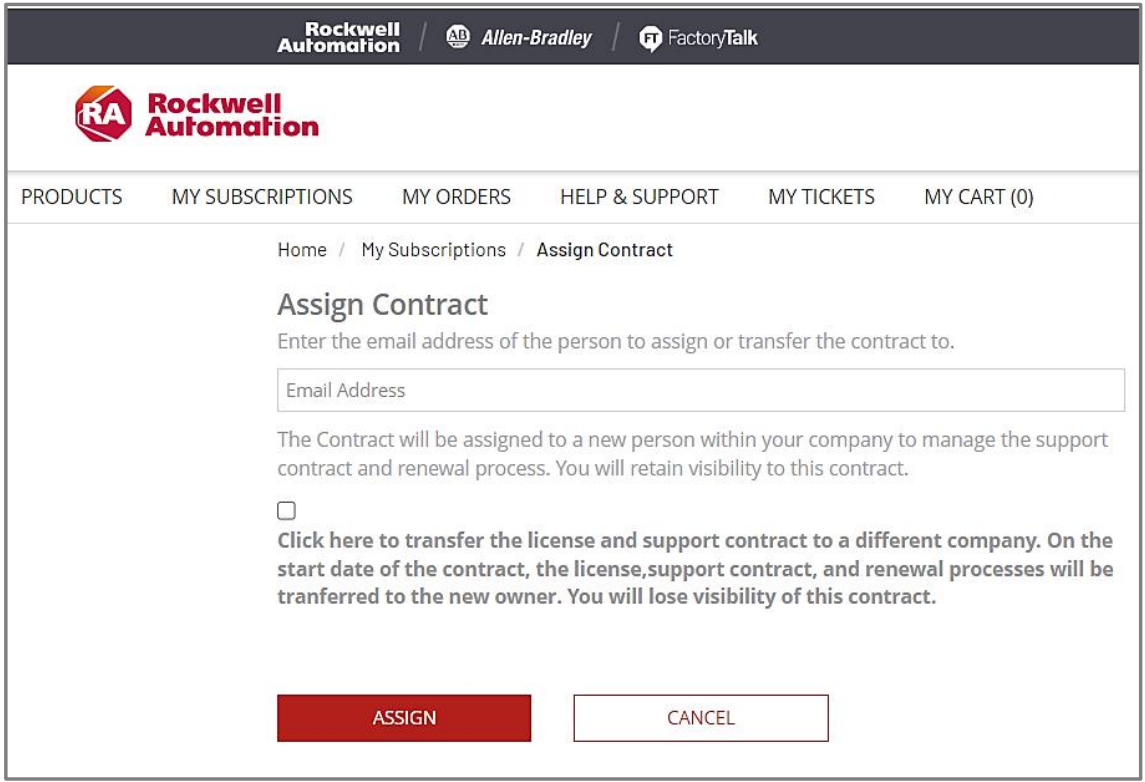
If the new user is not within your company, check the checkbox below email address

Upon clicking the checkbox, the dialog will expand to allow details of the new owner and their company to be entered. When email address is entered and new company data is ready, click the Assign button.
If your end customer does not have a valid BPID setup in the system, please send a ticket request via the Ticket System in the Commerce Portal help.
- Click HELP & SUPPORT
- Select Category: Account
- Select sub-category: Account creation, update, login or reset issue
- Enter Subject.
- Provide details in the Question field regarding the end customer to be added and their contact information.
Refer to the Commerce Portal User Guide, publication GMSG-RM002, and QA63189 – Assigning a Contract in the Software Portal for further help.
Source: Rockwell Automation’s Technote database.