Tiếng Việt
Technical Support
FactoryTalk Optix containers: Licensing
Summary
FactoryTalk Optix containers: Licensing
Content
FactoryTalk Optix containers must have access to internet to function (be licensed) properly, this can be through a direct connection or through a proxy server.
The reason for this is when an FactoryTalk Optix project is deployed to a container, it looks for the license at optix-license-wapi.cloud.rockwellautomation.com upon startup and checks it periodically every 30 minutes.
If it doesn’t find a license (e.g. no access to internet), the Optix application will start in two-hour demo mode and the following message will appear in Optix Studio:

The same thing happens when starting the container if it already has an application loaded, as the Optix runtime starts automatically.
If a license is found, the entitlement found message appears:

If it starts with a license, the system periodically checks the address optix-license-wapi.cloud.rockwellautomation.com to verify that it still has a license.
If it does not find a license, it will enter the grace period mode:
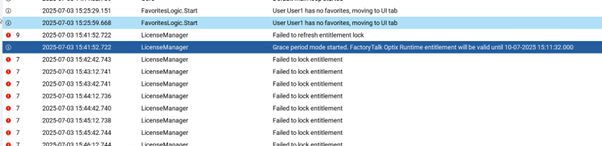
This mode lasts 7 days and the runtime will continue to function. The container will check the license every 30 seconds but will run without problems during this period. As soon as it finds the license, it will stop the grace mode and enter normal mode.
While in grace mode, if you stop the container or the project, the grace period expires; and if you restart it, it will enter a two-hour demo mode.
For the most recent information regarding this functionality refer to FactoryTalk Optix Help – Call Home entitlement mechanism.
For offline licensing – activation and rehost – procedures check out the Github public repository – Offline Licensing for FactoryTalk Optix Containers
Source: Rockwell Automation’s Technote database.